Route53 Active-Passive Failover for Internal Endpoint

Recently, I was assigned to a task where we need to setup an Active-Passive failover setup for an internal application. This application is a part of one of our main applications and only has an internal endpoint.
The setup is simple as it looks. We have two Auto scaling groups, two internal NLBs, two Route53 records for failover (Primary and secondary), and a health-check.
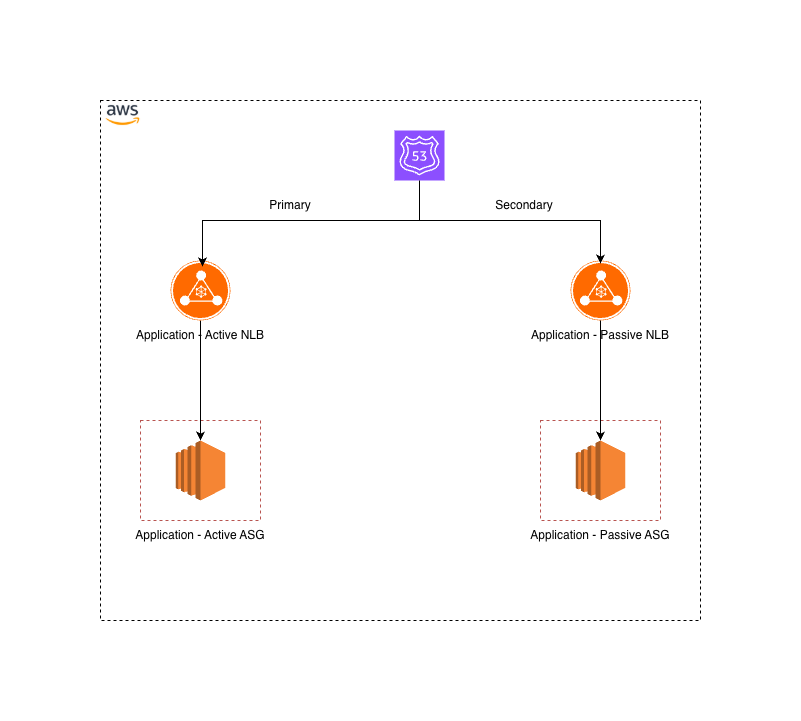
Does it simple as it seems?
No. Although it seems simple, there is a challenge. In order to setup an automatic fail-over scenario in Route53, we need to have an health check. This health-check checks the configured endpoint from global location. So we need to have a public endpoint in order to this health-check works. But the thing is, our endpoint is internal. Hence we cannot use this health-check.
So.. How to achieve this?
There is no direct way that you can achieve this. But you can tweak it. For that you need a Lambda function.
Route53 health-checks we can configure using Cloudwatch alarm. We can utilize that option to achieve our goal. So the complete components we need as below.
- Two ASGs for Active-Passive setup
- Two NLBs to forward traffic to above
- Custom lambda function to push a custom metric to Cloudwatch [1]
- Cloudwatch alarm created with custom metric
- Route53 health-check with Cloudwatch alarm
- Fail-over DNS record with using the health-check
I'm not going to explain about the architecture in details. Let's focus on the actual solution. The key point in the solution is the Lambda function. Here we need a lambda function in order to publish a custom metric to Cloudwatch. This custom metric is actually the connectivity status of the internal endpoint. Didn't get it? Let me explain.
Since we cannot configure the R53 health-check directly to an internal endpoint, we need to find a way to check the status of the internal endpoint. For that we can use this Lambda function. In our case, we have a Python script which connects to the given endpoint (Application Active Node) and publish "0" if it's not reachable and "1" if reachable to Cloudwatch. With the lambda function we have configured an Eventbridge rule to schedule this execution for every one minutes. And we have created a cloudwatch alarm based on that custom TCP check metric. You need to make sure that the Lambda function has an IAM role attached with the relevant permissions to push metrics to Cloudwatch.
By this approach, we are able to monitor the internal endpoint with Cloudwatch. Next part is the Route53 health-check. We can configure the health-check to use that alarms as a metric. So it check time-to-time within the given interval and check if the alarm is active. If so it automatically fail-over to the secondary target, which is the Passive node.
With this we are able to setup Active-passive failover mechanism with using the Route53 for internal endpoint. Hope you enjoy reading this.
[1]https://docs.aws.amazon.com/AmazonCloudWatch/latest/monitoring/publishingMetrics.html
[2] https://docs.aws.amazon.com/Route53/latest/DeveloperGuide/dns-failover-private-hosted-zones.html