What is Linux?

If you’re starting your DevOps journey, the very first skill you need is Linux. Linux is the base for everything in the DevOps. From running a simple monolith app to deploying multi-cluster Kubernetes environment and managing servers on AWS, almost everything relates to Linux.
In this guide, we’ll cover the Linux fundamentals that every beginner should know. By the end, you’ll be able to navigate the terminal, work with files, manage processes, and understand how Linux systems are structured.
Why Linux Matters for DevOps
- Dominates the industry – Most services on the internet run on Linux.
- Power behind the containers & orchestration – Docker, Kubernetes, and CI/CD pipelines are built around Linux.
- Open-source and customizable – You can tweak it for performance and automation. And it's free!
- Essential for troubleshooting – Knowing Linux saves hours when diagnosing most of the issues.
💡 Think of Linux as the foundation layer of all DevOps work.
Getting Started with Linux
If you’re new, here are a few ways to try Linux:
- Install on your machine – Ubuntu, Fedora or CentOS(beginner-friendly).
- Windows Subsystem for Linux (WSL) – Run Linux inside Windows easily.
- Cloud instances – Launch an Ubuntu EC2 instance on AWS (free-tier works) or any other cloud provider.
Basic Linux Concepts
- Linux File System - Linux is based on files. Almost everything you see in Linux is a file. So you need to have a better understanding on Linux file system. It start from the root directory (/). Root is the topmost level of file hierarchy.
/
├── bin -> usr/bin
├── boot
├── cdrom
├── dev
├── etc
├── home
├── lib -> usr/lib
├── lib64 -> usr/lib64
├── lost+found
├── media
├── mnt
├── opt
├── proc
├── root
├── run
├── sbin -> usr/sbin
├── snap
├── srv
├── sys
├── tmp
├── usr
└── var
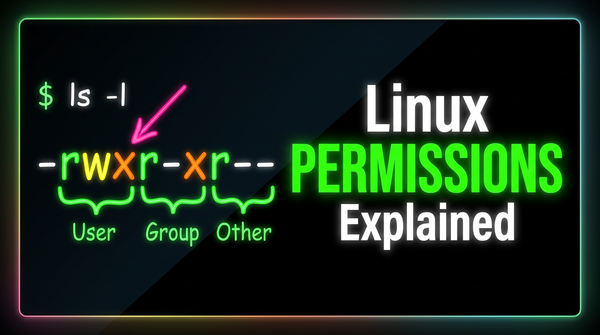
- Users & permissions – You MUST have deep knowledge on managing users and permissions in Linux. Root (admin) vs non-root users, groups,
chmodfor permissions. - Storage management: How you mount volumes, create VG, LVM etc
- Processes – Running programs managed by the kernel.
- Packages – Software installed via
apt(Ubuntu/Debian) oryum/dnf(RHEL/Fedora). - CLI – Command-line interpreter (Bash, Zsh).
Essential Linux Commands
These are the basic command that most of the users use in day-to-day activities.
Navigation
pwd      # show current directory
ls -l    # list files with details
cd /etc  # move to /etc directory
File operations
touch file.txt       # create file
cp file.txt backup/  # copy file
mv file.txt docs/    # move file
rm file.txt          # delete file
Viewing files
cat file.txt   # print file content
less file.txt  # scroll inside file
head -n 5 file.txt  # first 5 lines
tail -f /var/log/syslog  # live log view
Search & filters
grep "error" app.log   # search for 'error'
find /var -name "*.log" # find all .log files
Networking
ping google.com   # check connectivity to endpoint
curl https://example.com # check whether URL accessible
System monitoring
top       # running processes
df -h     # disk usage
free -m   # memory usage
Working with the CLI
- History
history     # show command history
!!          # run last command
!25         # rerun command #25
- Pipes & redirection
ls -l | grep ".txt"  # list only .txt files
echo "hello" > file.txt   # overwrite
echo "world" >> file.txt  # append
- Environment variables
echo $HOME #Print env variable
export MYVAR=devops #add new variable
- Aliases
alias ll='ls -al' #create an alias
💡 Tip
Use man infront of your command to view the manual page.
Example: man ls
Homework 😉
Try these to build muscle memory:
- Navigate to
/home, create a new folder, and a file inside it. - Change the file’s permissions so only you can read/write it.
- Use
grepto search for “root” in/etc/passwd. - Monitor your CPU usage with
top. - Compress your folder into a
.tar.gzarchive and extract it back.
Best Practices & Tips
- Avoid running as root unless absolutely necessary (
sudoinstead). - Keep your system updated.
sudo apt update && sudo apt upgrade -y - Learn at least one editor (
nano→ later move tovim). - Save useful aliases in
~/.bashrc.
Common Mistakes Beginners Make
- Accidentally deleting files with:
rm -rf /
(Don’t ever try this!) - Forgetting file permissions when debugging.
- Running services without checking logs in
/var/log/. - Ignoring the difference between root and user commands.
Conclusion & Next Steps
Congrats 🎉 — you now know the fundamentals of Linux! This is the first step in your DevOps journey.
👉 From here, you can dive into:
- Advanced Linux – Bash scripting, cron jobs, managing services, package management, storage management.
- Networking basics – ports, firewalls, SSH.
- Practical DevOps – Docker & Kubernetes (both run on Linux).
for more information you can refer this tutorial from freecodecamp.org
freecodecamp.org
Stay tuned for our next chapter on Linux. We will discuss users and permissions.